Using AI Coding Agents Well (Part 2): Give Each Agent Its Own Workspace With Git Worktree
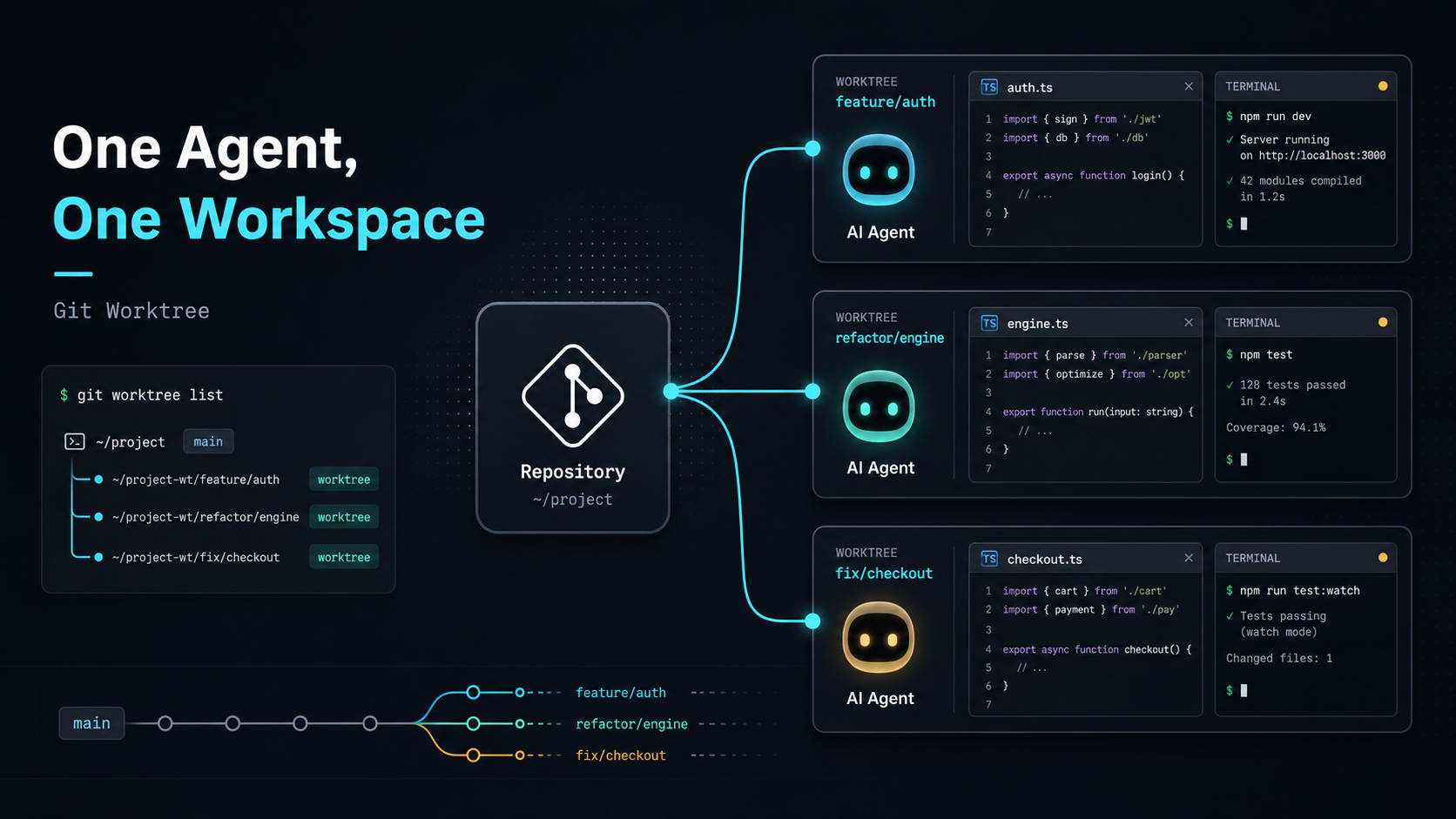
In the previous post, I described why branches alone did not solve my multi-Agent workflow. A single working directory keeps everyone tied to the same checkout state.
When an Agent is running a long task on one branch, switching the same folder to another branch also changes the files that Agent sees. Its context, test results, and next edits can stop matching the current file state.
The solution I moved to was Git worktree. It gives me the structure I actually needed:
One repo can open different branches in different folders at the same time.
Worktree separates a branch from the single checkout state, so each Agent has its own file workspace.
The Worktree Model
Git worktree lets one Git repository have multiple working trees.
In practice, it lets different branches live in different working directories.
It does not clone the repository again. The worktrees still share the same Git object database, while each worktree keeps its own file directory and checkout state.
Here is the plain model:
project/
  main

project.prompt-eval/
  agent/prompt-eval

project.search-page/
  feature/search-page
Each folder has its own checkout state. If you edit files in project.search-page, you are not changing the working directory of project.prompt-eval.
There is still a cost. Each worktree has real files on disk, so space complexity is roughly O(s), where s is the expanded size of the working tree. Because it shares the Git object database, it is usually lighter than a full clone, but node_modules, build cache, .env, and generated outputs still need to be managed per worktree.
Creating or switching a worktree is mostly bounded by the cost of checking out files, roughly O(n), where n is the number of files written to the working directory. In exchange, you get a stable isolation boundary: a long-running Agent task will not be interrupted by another branch checkout.
Create an Agent Workspace
Assume I am in the main project folder:
cd luke-tech-blogTo create a new branch and a new working directory for prompt evaluation, I can run:
git worktree add ../luke-tech-blog.prompt-eval -b agent/prompt-evalThis command does two things:
- Creates a new branch:
agent/prompt-eval - Creates a new working directory:
../luke-tech-blog.prompt-eval
Then I can enter that folder:
cd ../luke-tech-blog.prompt-evalFrom that point on, this folder is the workspace for the agent/prompt-eval branch.
The original luke-tech-blog folder can stay on main or another branch, without affecting this task.
If the branch already exists and I only want to create a working directory for it, I can run:
git worktree add ../luke-tech-blog.search-page feature/search-pageThis checks out feature/search-page into ../luke-tech-blog.search-page.
Now another Agent can work inside that folder.
Manage Worktrees
To see which worktrees are currently connected to the repository:
git worktree listThe output may look like this:
/Users/luke/projects/luke-tech-blog                    abc1234 [main]
/Users/luke/projects/luke-tech-blog.prompt-eval        def5678 [agent/prompt-eval]
/Users/luke/projects/luke-tech-blog.search-page        789abcd [feature/search-page]
After the task is done and the branch is merged, remove the worktree:
git worktree remove ../luke-tech-blog.prompt-evalIf you manually delete the folder, Git may still keep a stale worktree record. Clean it up with:
git worktree pruneCommand Recap
For daily use, remember three commands first:
git worktree add,git worktree list, andgit worktree remove.
My Multi-Agent Assignment Pattern
After adopting Git worktree, my multi-Agent workflow looks like this:
git worktree add ../project.prompt-eval -b agent/prompt-eval
git worktree add ../project.search-page -b agent/search-page
git worktree add ../project.refactor-card -b agent/refactor-card
Then I make the task boundary explicit:
You are working in ../project.prompt-eval.
Focus on the prompt evaluation task.
Do not change UI, deployment config, or unrelated data structures.
When finished, report changed files, test results, and risks.
Another Agent might get:
You are working in ../project.search-page.
Implement the frontend search page.
Do not modify prompt evaluation files.
When finished, run the build and summarize the main diff.
The repeatable workflow is:
- one Agent maps to one clear task
- one task maps to one branch
- one branch maps to one worktree
- each worktree has its own file state
This lowers review cost. Each worktree ends with one focused diff, and an engineer can use the normal Git workflow to inspect changes, run tests, and decide merge order.
The Pain It Solves
Git worktree directly solves the problem of shared working-directory state.
In a single folder, switching branches changes the whole working directory. You, Agent A, and Agent B are all sharing the same file workspace. If one party switches branches, the others are affected.
With worktree, each Agent has its own desk:
project/
  main

project.prompt-eval/
  agent/prompt-eval

project.search-page/
  agent/search-page

project.refactor-card/
  agent/refactor-card
This gives several practical benefits:
- long-running tasks are not interrupted when you switch branches elsewhere
- changes from different Agents do not mix in the same working directory
- each task produces a cleaner diff for review
- you can keep a clean main workspace
- multiple Agents can actually work in parallel
Workflow Takeaway
Worktree gives each Agent a stable file workspace while the task is running, even though final merges can still conflict.
Humans Coordinate the Boundaries
As AI Coding Agents become more capable, the human role moves closer to coordination.
I now spend more time on:
- defining task boundaries
- choosing which work belongs to an Agent
- assigning worktrees
- limiting the allowed edit scope
- asking the Agent to verify its work
- reviewing diffs
- deciding what can be merged
Git worktree helps here because it provides the isolation boundary that the engineering workflow needs. Multiple Agents can work at the same time, while humans keep control over review, verification, and integration.
Practical Notes
There are a few details to watch for.
First, the same branch usually cannot be checked out by two worktrees at the same time. Git does this to prevent the same line of work from being modified in two places.
Second, avoid placing worktrees inside the original repo folder. Some tools may search, format, test, or watch those nested worktrees by accident.
I prefer a structure like this:
projects/
  luke-tech-blog/
  luke-tech-blog.prompt-eval/
  luke-tech-blog.search-page/
  luke-tech-blog.refactor-card/
Third, each worktree may need its own dependencies. Even if the worktrees share Git objects, files like node_modules, build cache, .env, and generated outputs still need separate handling.
Here is a practical tip: if your project uses pnpm (which works wonderfully with Astro projects), its unique global hard-link store design makes running pnpm install in each worktree instantaneous while taking almost zero extra disk space. This completely solves the disk bloating and slow package installation pain points typical of multi-worktree setups.
Furthermore, to avoid cluttering your desktop with multiple Cursor or VS Code windows, you can leverage VS Code’s Multi-root Workspace feature. Create a simple .code-workspace file in your root and declare your main project folder alongside active worktree folders:
{
  "folders": [
    { "path": "luke-tech-blog" },
    { "path": "../luke-tech-blog.prompt-eval" },
    { "path": "../luke-tech-blog.search-page" }
  ]
}
This lets you view and manage files across different isolated workspaces from the sidebar of a single Cursor window, making diff reviews and task coordination extremely convenient.
Fourth, worktree isolates workspace state. It does not eliminate merge conflicts.
If two Agents edit the same core file, the final merge can still conflict. Worktree prevents them from stepping on each other during execution, but humans still need to design task boundaries first.
I prefer assigning these tasks to separate worktrees:
- long-running evaluation tasks
- different feature work
- bug fixes
- documentation updates
- test coverage improvements
- UI and backend work that can be clearly separated
- small refactors with clear scope
I avoid parallelizing these tasks across multiple Agents:
- multiple Agents refactoring the same core abstraction
- multiple Agents changing a shared schema
- multiple Agents changing global config
- vague tasks like “optimize the whole project”
Conclusion
When an AI Coding Agent only edits a small piece of code, one IDE and one working directory are usually enough. Once Agents start running long tasks, or multiple Agents work on different features at the same time, workspace management becomes the first engineering gap to close.
Git worktree provides a practical base. Each Agent gets its own branch and folder. Different tasks are isolated at the file level. Humans define tasks, inspect results, and integrate changes.
Final Takeaway
The first step toward using AI Coding Agents well is giving each long-running task a stable, verifiable, and disposable workspace.