Using AI Coding Agents Well (Part 1): When Branches Are Not Enough for Multi-Agent Work
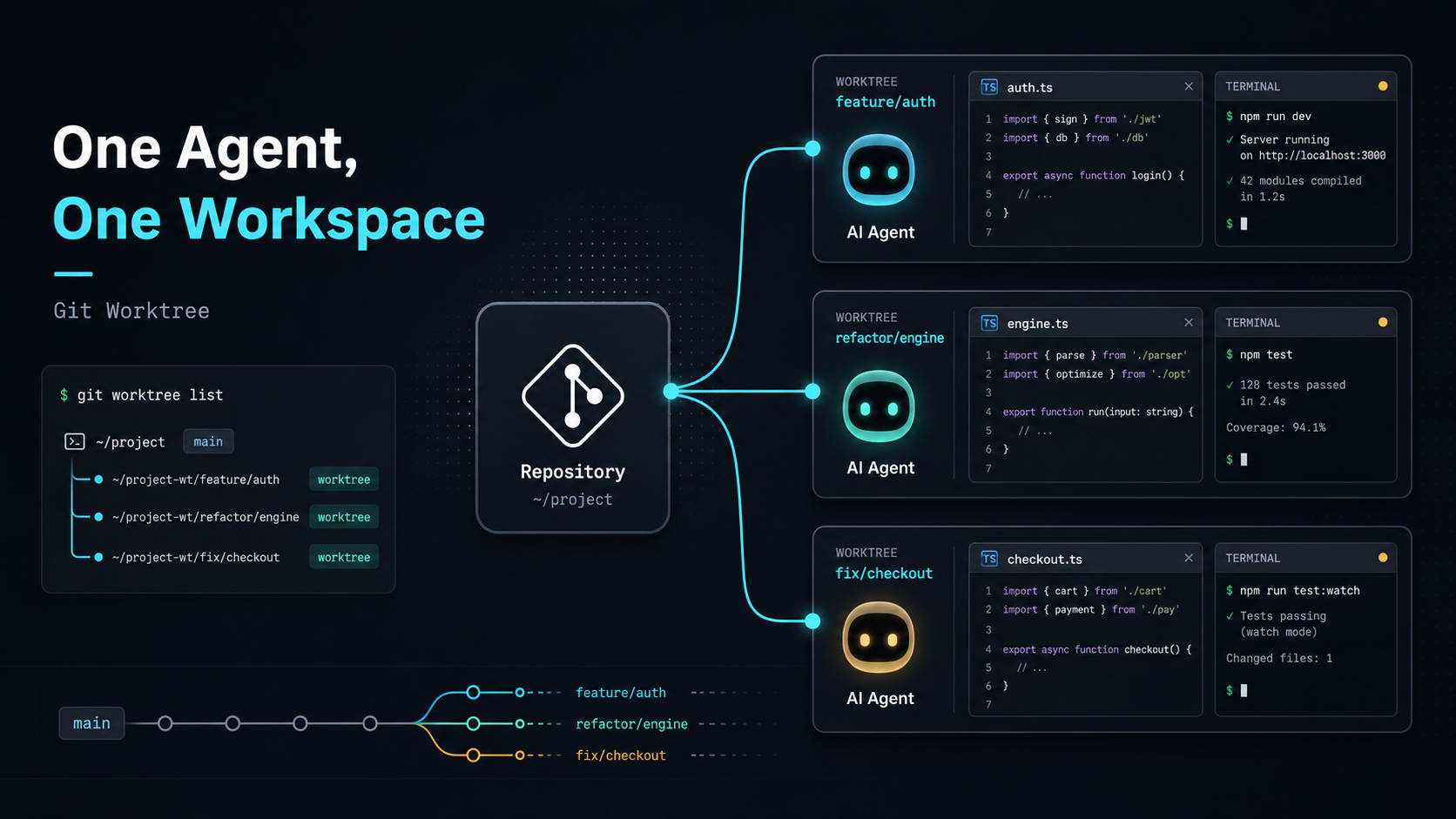
AI Coding Agents are no longer just tools that help fill in a few lines of code.
I personally pay for several AI coding tools, including Cursor, Anthropic Claude Code, and OpenAI Codex. Their interfaces are different, but their capabilities are moving in a similar direction: they can read a project, edit files, run tests, fix errors, and spend time completing a task that has a clear goal.
That changed how I use them. I used to keep AI inside the IDE, like an assistant I could call whenever I needed help. Later, I started treating an Agent more like someone who could take a task and work on it for a while. That shift sounds small, but it changes the whole workflow.
Once an Agent can work for a long time, we have to manage more than instructions. We also have to manage which copy of the project files it is using.
This is Part 1 of my “Using AI Coding Agents Well” series. I want to start with a real problem I ran into: once I began letting an Agent run longer tasks, my old habit of switching Git branches quickly stopped being enough.
Starting With Local Edits
My first way of working with AI was probably similar to many developers: select a piece of code in the IDE, then ask AI to change that specific part.
For example:
- refactor this function
- add TypeScript types
- explain this logic
- change this API call to another style
- add tests
This workflow is natural and useful. The unit of work is small, so the risk is easy to control. After AI makes the change, I check the diff, accept it if it looks good, or reject it if it does not.
At this stage, the workflow is simple: I know exactly what needs to change, and AI handles that small piece for me. It works like an accelerator for the task already in my hands.
When a task only takes a few minutes, this is enough. I still understand the current state of the project, which files changed, and whether I want to keep the result.
Long-Running Tasks Changed the Problem
Later, while doing Prompt Engineering work, I found a type of task that fits Agents especially well: long-running evaluation.
For example:
- running a batch of prompt evaluation cases
- comparing outputs from different prompt versions
- adjusting evaluator or LLM-as-a-judge logic
- changing prompts based on test results
- organizing traces or evaluation reports
These tasks usually do not end after one small edit. The Agent has to read the project, run commands, inspect results, change files, and verify again. A task may grow from a few minutes to half an hour or longer.
The problem appears while waiting. If one Agent is running prompt evaluation, I may still want to keep building a new feature, or ask another Agent to fix a bug.
My thought at the time was straightforward:
Can I let one Agent handle a long-running task in the background while I keep developing on another branch?
The obvious answer was to create a new branch.
Branches Look Like the Right Tool
That is what I tried first.
Suppose I have one main project folder:
luke-tech-blog/I can create a branch for the long-running task:
git checkout -b agent/prompt-evalThen I let the Agent run prompt evaluation on that branch.
If you are not familiar with Git, think of a branch as a different path for the same project. One path is for prompt evaluation, another path is for a new feature. That sounds reasonable.
Next, I wanted to continue building a new search page:
git checkout -b feature/search-pageThat was when the issue became obvious.
One project folder can only show the files from one branch at a time. When I switch from agent/prompt-eval to feature/search-page, the files in that folder also switch to another version.
That means the Agent running the long task suddenly sees a different set of project files.
For a human, this is easy to understand: I just switched branches, so the files changed. For the Agent that is still working, it only sees that the files in its folder suddenly changed. The content it just read, the tests it just ran, and the file it was about to modify may no longer match the new state.
Imagine two people sharing the same desk. Agent A is organizing one report. I suddenly replace every document on the desk with documents from another project. Agent A is still sitting there, but the things in front of it have changed.
Branches can separate different project paths, but they do not give each Agent its own desk.
The Real Problem Is Workspace Separation
That experience changed how I understood the problem.
The structure I needed was:
- one project
- different branches
- different folders
- all folders can exist at the same time
- switching one folder does not affect another Agent
Ideally, the project should look like this:
luke-tech-blog/
  main

luke-tech-blog.prompt-eval/
  agent/prompt-eval

luke-tech-blog.search-page/
  feature/search-page
Then I can assign tasks to different folders:
Agent A -> luke-tech-blog.prompt-eval
Agent B -> luke-tech-blog.search-page
Each Agent has its own branch and its own folder. The long-running task will not be interrupted when I switch branches elsewhere, and different Agents will not mix their changes in the same place.
This is the first practical constraint of multi-Agent collaboration: if tasks can run in parallel, workspaces also need to run in parallel.
In the next post, I will introduce the solution I moved to: Git worktree. It lets the same project open different branches in different folders, giving each Agent its own desk.
Conclusion
Once an Agent starts handling long-running tasks, each Agent needs a working folder that will not suddenly be replaced by someone else.