
Luke Dev Notes
Agentic AI, workflow automation, and engineering notes
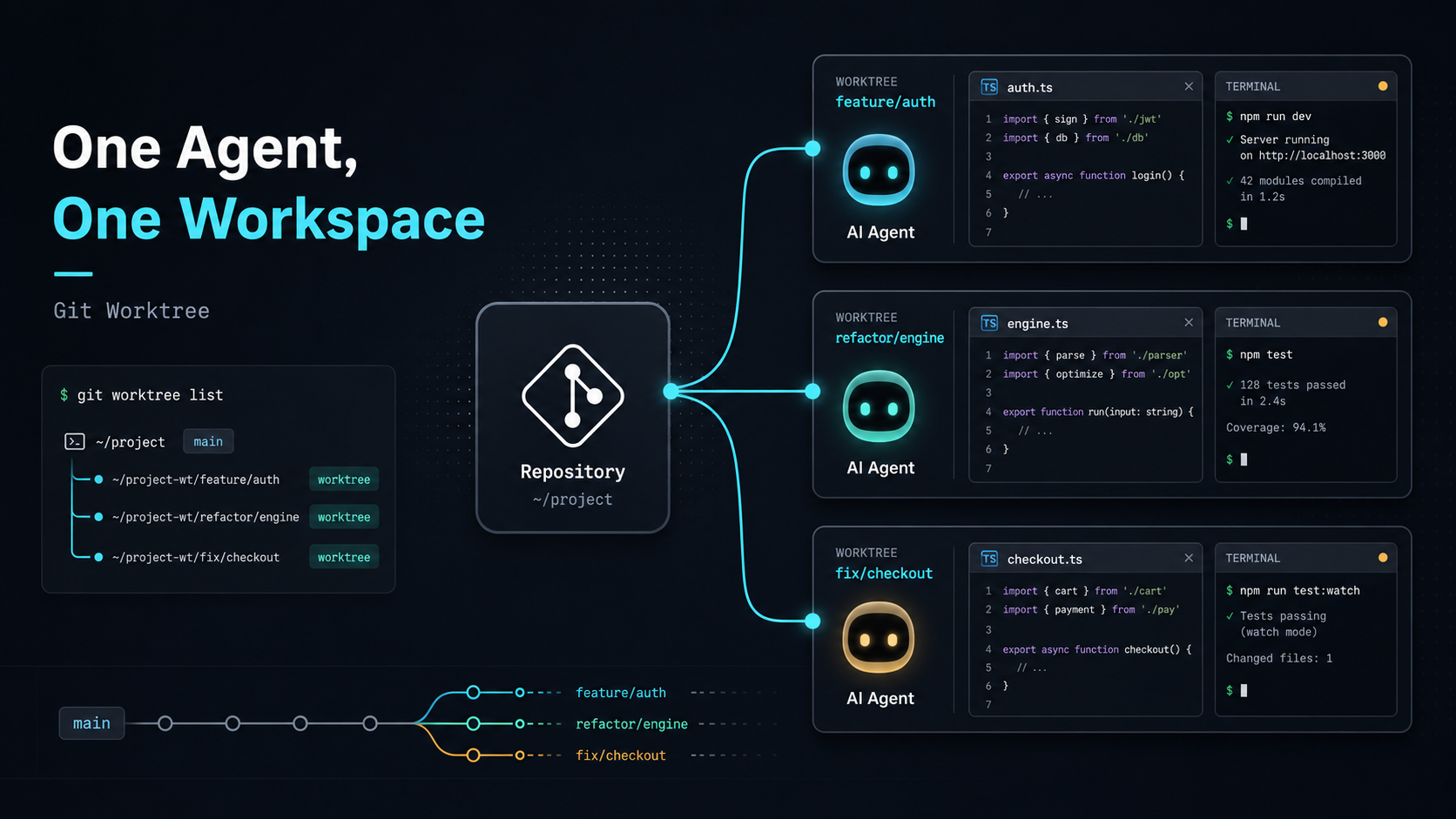
Using AI Coding Agents Well (Part 2): Give Each Agent Its Own Workspace With Git Worktree
In the previous post, I described why branches alone did not solve my multi-Agent workflow. A single working directory keeps everyone tied to the same checkout state.Using AI Coding Agents Well (Part 1): When Branches Are Not Enough for Multi-Agent WorkWhen an Agent is running a long task on one branch, switching the same folder to another branch also changes the files that Agent sees. Its context, test results, and next edits can stop matching the current file state. The solution I moved to was Git worktree. It gives me the structure I actually needed:One repo can open different branches in different folders at the same time.Worktree separates a branch from the single checkout state, so each Agent has its own file workspace.The Worktree Model Git worktree lets one Git repository have multiple working trees. In practice, it lets different branches live in different working directories. It does not clone the repository again. The worktrees still share the same Git object database, while each worktree keeps its own file directory and checkout state. Here is the plain model: project/ mainproject.prompt-eval/ agent/prompt-evalproject.search-page/ feature/search-pageEach folder has its own checkout state. If you edit files in project.search-page, you are not changing the working directory of project.prompt-eval. There is still a cost. Each worktree has real files on disk, so space complexity is roughly O(s), where s is the expanded size of the working tree. Because it shares the Git object database, it is usually lighter than a full clone, but node_modules, build cache, .env, and generated outputs still need to be managed per worktree. Creating or switching a worktree is mostly bounded by the cost of checking out files, roughly O(n), where n is the number of files written to the working directory. In exchange, you get a stable isolation boundary: a long-running Agent task will not be interrupted by another branch checkout. Create an Agent Workspace Assume I am in the main project folder: cd luke-tech-blogTo create a new branch and a new working directory for prompt evaluation, I can run: git worktree add ../luke-tech-blog.prompt-eval -b agent/prompt-evalThis command does two things:Creates a new branch: agent/prompt-eval Creates a new working directory: ../luke-tech-blog.prompt-evalThen I can enter that folder: cd ../luke-tech-blog.prompt-evalFrom that point on, this folder is the workspace for the agent/prompt-eval branch. The original luke-tech-blog folder can stay on main or another branch, without affecting this task. If the branch already exists and I only want to create a working directory for it, I can run: git worktree add ../luke-tech-blog.search-page feature/search-pageThis checks out feature/search-page into ../luke-tech-blog.search-page. Now another Agent can work inside that folder. Manage Worktrees To see which worktrees are currently connected to the repository: git worktree listThe output may look like this: /Users/luke/projects/luke-tech-blog abc1234 [main] /Users/luke/projects/luke-tech-blog.prompt-eval def5678 [agent/prompt-eval] /Users/luke/projects/luke-tech-blog.search-page 789abcd [feature/search-page]After the task is done and the branch is merged, remove the worktree: git worktree remove ../luke-tech-blog.prompt-evalIf you manually delete the folder, Git may still keep a stale worktree record. Clean it up with: git worktree pruneCommand RecapFor daily use, remember three commands first: git worktree add, git worktree list, and git worktree remove.My Multi-Agent Assignment Pattern After adopting Git worktree, my multi-Agent workflow looks like this: git worktree add ../project.prompt-eval -b agent/prompt-eval git worktree add ../project.search-page -b agent/search-page git worktree add ../project.refactor-card -b agent/refactor-cardThen I make the task boundary explicit: You are working in ../project.prompt-eval. Focus on the prompt evaluation task. Do not change UI, deployment config, or unrelated data structures. When finished, report changed files, test results, and risks.Another Agent might get: You are working in ../project.search-page. Implement the frontend search page. Do not modify prompt evaluation files. When finished, run the build and summarize the main diff.The repeatable workflow is:one Agent maps to one clear task one task maps to one branch one branch maps to one worktree each worktree has its own file stateThis lowers review cost. Each worktree ends with one focused diff, and an engineer can use the normal Git workflow to inspect changes, run tests, and decide merge order. The Pain It Solves Git worktree directly solves the problem of shared working-directory state. In a single folder, switching branches changes the whole working directory. You, Agent A, and Agent B are all sharing the same file workspace. If one party switches branches, the others are affected. With worktree, each Agent has its own desk: project/ mainproject.prompt-eval/ agent/prompt-evalproject.search-page/ agent/search-pageproject.refactor-card/ agent/refactor-cardThis gives several practical benefits:long-running tasks are not interrupted when you switch branches elsewhere changes from different Agents do not mix in the same working directory each task produces a cleaner diff for review you can keep a clean main workspace multiple Agents can actually work in parallelWorkflow TakeawayWorktree gives each Agent a stable file workspace while the task is running, even though final merges can still conflict.Humans Coordinate the Boundaries As AI Coding Agents become more capable, the human role moves closer to coordination. I now spend more time on:defining task boundaries choosing which work belongs to an Agent assigning worktrees limiting the allowed edit scope asking the Agent to verify its work reviewing diffs deciding what can be mergedGit worktree helps here because it provides the isolation boundary that the engineering workflow needs. Multiple Agents can work at the same time, while humans keep control over review, verification, and integration. Practical Notes There are a few details to watch for. First, the same branch usually cannot be checked out by two worktrees at the same time. Git does this to prevent the same line of work from being modified in two places. Second, avoid placing worktrees inside the original repo folder. Some tools may search, format, test, or watch those nested worktrees by accident. I prefer a structure like this: projects/ luke-tech-blog/ luke-tech-blog.prompt-eval/ luke-tech-blog.search-page/ luke-tech-blog.refactor-card/Third, each worktree may need its own dependencies. Even if the worktrees share Git objects, files like node_modules, build cache, .env, and generated outputs still need separate handling. Here is a practical tip: if your project uses pnpm (which works wonderfully with Astro projects), its unique global hard-link store design makes running pnpm install in each worktree instantaneous while taking almost zero extra disk space. This completely solves the disk bloating and slow package installation pain points typical of multi-worktree setups. Furthermore, to avoid cluttering your desktop with multiple Cursor or VS Code windows, you can leverage VS Code's Multi-root Workspace feature. Create a simple .code-workspace file in your root and declare your main project folder alongside active worktree folders: { "folders": [ { "path": "luke-tech-blog" }, { "path": "../luke-tech-blog.prompt-eval" }, { "path": "../luke-tech-blog.search-page" } ] }This lets you view and manage files across different isolated workspaces from the sidebar of a single Cursor window, making diff reviews and task coordination extremely convenient. Fourth, worktree isolates workspace state. It does not eliminate merge conflicts. If two Agents edit the same core file, the final merge can still conflict. Worktree prevents them from stepping on each other during execution, but humans still need to design task boundaries first. I prefer assigning these tasks to separate worktrees:long-running evaluation tasks different feature work bug fixes documentation updates test coverage improvements UI and backend work that can be clearly separated small refactors with clear scopeI avoid parallelizing these tasks across multiple Agents:multiple Agents refactoring the same core abstraction multiple Agents changing a shared schema multiple Agents changing global config vague tasks like “optimize the whole project”Conclusion When an AI Coding Agent only edits a small piece of code, one IDE and one working directory are usually enough. Once Agents start running long tasks, or multiple Agents work on different features at the same time, workspace management becomes the first engineering gap to close. Git worktree provides a practical base. Each Agent gets its own branch and folder. Different tasks are isolated at the file level. Humans define tasks, inspect results, and integrate changes. Final TakeawayThe first step toward using AI Coding Agents well is giving each long-running task a stable, verifiable, and disposable workspace.
Read More
PostgreSQL Optimization (Part 1): LIKE vs Regex, which is actually faster?
This post comes from a real performance issue I hit at work. I took a few wrong turns before I understood what was actually slow. This is Part 1: LIKE vs Regex and the I/O vs CPU story. The next two parts go deeper:Part 2: Reading EXPLAIN to see where Seq Scan hides Part 3: Turning tags into an index with Array + GINPart 1: LIKE vs Regex in plain language 1. The setup I inherited ETL-shaped data where many tags were packed into one text field, separated by ;: tag1;tag2;tag3;tag_VIP;tag_inactive So I did the obvious thing: filter with many LIKE conditions. 2. One comment that hit the real issue A senior teammate said:“Merge those LIKE clauses into one Regex. It should run faster.”My first reaction: “If there is no useful index, don’t both approaches still read a lot of rows?” 3. We were not disagreeing, just entering from different angles We were solving the same problem, but from different starting points: I focused on read cost first, while my teammate focused on compute cost first.My focus: I/O costWithout an index, the database often still scans a large part of the table. Teammate’s focus: CPU costMany LIKEs can repeat string checks on the same row.One Regex often reduces that repeated per-row work.A simple analogy:Many LIKEs = reading the same page many times, each time looking for one word. One Regex = reading the page once and checking many words in that pass.4. What I want to pass on If your dataset is small, Regex alone may already feel much better.At larger scale, syntax tweaks are not enough. You need to change how the database reaches the data. ConclusionRegex can reduce CPU work, but if the query still scans most rows, I/O remains the real bottleneck.Part 2 dissects LIKE and Regex with EXPLAIN ANALYZE; Part 3 builds the Array + GIN solution:PostgreSQL Optimization (Part 2): Reading EXPLAIN to see where Seq Scan hides PostgreSQL Optimization (Part 3): Turning tags into an index with Array + GIN
Read More PostgreSQL Optimization (Part 2): Reading EXPLAIN to see where Seq Scan hides
If you haven't read the LIKE/Regex vs I/O/CPU story, start there. If you'd rather jump straight to the implementation, head to Part 3:Part 1: LIKE vs Regex - what's actually different? Part 3: Turning tags into an index with Array + GINProblem framing: CPU improved, but the query was still too slow Part 1 showed that Regex can lower per-row CPU compared to many LIKEs. At tens of millions of rows the bottleneck shifts to I/O and access path, and per-row CPU savings stop mattering. This part has one job: use EXPLAIN ANALYZE to find exactly where LIKE/Regex pin the query to full-table I/O. Once we see the bottleneck, Part 3 fixes the access path.Core analysis: read EXPLAIN to find the cost dominatorNote: the EXPLAIN snippets and SQL below are anonymized — schema, table, and column names (e.g. customers, tag_dictionary, balance) are stand-ins. Execution stats (rows, loops, Rows Removed, Buffers) come from a small test dataset and are shown for structural recognition only: focus on what each node looks like, where conditions sit, and whether PostgreSQL finds an index entry. The absolute numbers do not represent production scale.Open the LIKE plan with EXPLAIN ANALYZE and the first thing that jumps out: the same query touches the main table with three separate Seq Scan nodes. To understand why, we have to look at the SQL itself. Trace each Seq Scan back to the SQL that triggered it Here is the simplified LIKE-version SQL with the table-touch points marked: WITH product_dict AS ( -- ← trigger 1 SELECT DISTINCT product_id, product FROM customers WHERE product <> '' ) SELECT ... FROM customers AS main -- ← trigger 2 INNER JOIN product_dict ... WHERE main.segment = 'core' AND lower(main.levels) LIKE '%lv1%' AND lower(main.excluded_levels) NOT LIKE '%ex001%' AND lower(main.excluded_levels) NOT LIKE '%ex022%' AND date_trunc('MONTH', main.etl_date) = date_trunc('MONTH', (SELECT MAX(etl_date) FROM customers)); -- ← trigger 3Three innocent-looking constructs at the SQL level: a CTE, a main FROM, a MAX() subquery. To PostgreSQL, every one of them is "open the table again." Their EXPLAIN counterparts are three Seq Scan nodes: -> Aggregate -- trigger 3: InitPlan 1 -> Seq Scan on customers Buffers: shared hit=159-> Seq Scan on customers main -- trigger 2: main FROM Filter: customer_id <> '' AND segment = 'core' AND lower(levels) ~~ '%lv1%' AND lower(excluded_levels) !~~ '%ex001%' AND lower(excluded_levels) !~~ '%ex022%' AND date_trunc('MONTH', etl_date) = (InitPlan 1).col1 Rows Removed by Filter: 3806 Buffers: shared hit=318-> Seq Scan on customers -- trigger 1: inside the CTE Filter: product <> '' Rows Removed by Filter: 3835 Buffers: shared hit=159Four signals worth reading carefully:Three Seq Scan nodes: each one is "walk the entire table again." Rows Removed by Filter close to the node's rows: most of what we read is just thrown away. No condition becomes an Index Cond: every WHERE clause lands inside Filter, meaning PostgreSQL could not find any index entry point. The three Buffers: shared hit together approach the table's full page count: the table is effectively read three times.Why LIKE locks every scan to Seq Scan PostgreSQL only considers B-tree indexes by default (unless you've explicitly built GIN, GiST, or another type for that column). A B-tree is an ordered tree. Conditions it can accelerate share one property: a starting key has to be pinnable in the tree — for example name = 'Luke' or name LIKE 'Lu%' both let it descend from a specific node. Once that property breaks, the index has nowhere to start. Look back at the three triggers:lower(levels) LIKE '%lv1%': leading %, no entry point in the tree. lower(excluded_levels) NOT LIKE '%ex001%': NOT LIKE is "verify a non-match for every row" — a B-tree is poor at negative matching. date_trunc('MONTH', etl_date) = ...: the column is wrapped in a function, so the B-tree can't find a matching key (unless you build an expression index).The three Seq Scans come from one structural fact: the LIKE-plus-function-wrapping style gives PostgreSQL no index entry point at all. What the Regex rewrite actually changes Replacing the two NOT LIKEs with a Regex compiled from a lookup table changes the SQL shape entirely: WITH remove_list AS ( -- ← trigger 1 SELECT '(^|;|,)(' || REPLACE(string_agg(TRIM(code), '|'), ' ', '') || ')($|;|,)' AS regex_pattern FROM tag_dictionary WHERE kind = 'exclude' AND category IN ('low_marketing', 'private_bank') ) SELECT cluster_list.display_name, main.etl_date, product_list.product, SUM(main.balance)::numeric / COUNT(DISTINCT main.customer_id) AS avg_balance FROM ( SELECT * FROM customers -- ← trigger 2 WHERE customer_id <> '' AND segment = 'core' AND etl_date = (SELECT MAX(etl_date) FROM customers) -- ← trigger 3 ) AS main LEFT JOIN ( SELECT DISTINCT '%' || lower(code) || '%' AS level_code, display_name FROM tag_dictionary -- ← trigger 4 WHERE display_name = 'HVIP' ) AS cluster_list ON main.levels LIKE cluster_list.level_code LEFT JOIN ( SELECT DISTINCT product_id, product FROM customers -- ← trigger 5 WHERE customer_id = '' AND product <> '' ) AS product_list ON main.product_id = product_list.product_id CROSS JOIN remove_list WHERE COALESCE(main.excluded_levels, '') !~ remove_list.regex_pattern AND cluster_list.display_name <> '' AND main.product_id <> 0;Five table-touch points map to five Seq Scan nodes: -> Aggregate -- trigger 3: InitPlan 1 (same as LIKE) -> Seq Scan on customers Buffers: shared hit=159-> Aggregate -- trigger 1: remove_list CTE -> Seq Scan on tag_dictionary Filter: kind = 'exclude' AND category IN ('low_marketing','private_bank') Buffers: shared hit=4-> Seq Scan on tag_dictionary -- trigger 4: cluster_list subquery Filter: display_name = 'HVIP' Buffers: shared hit=4-> Seq Scan on customers main -- trigger 2: main FROM Filter: customer_id <> '' AND product_id <> 0 AND segment = 'core' AND etl_date = (InitPlan 1).col1 Rows Removed by Filter: 3308 Buffers: shared hit=318-> Seq Scan on customers -- trigger 5: product_list subquery Filter: product <> '' AND customer_id = '' Rows Removed by Filter: 3835 Buffers: shared hit=159The main customers table is still scanned three times (triggers 2, 3, 5). The two extra Seq Scans are on the dictionary table (triggers 1, 4). More importantly, the LIKE/Regex predicates that used to live in the main Filter: are now split across two Join Filter: nodes: -> Nested Loop -- applies the Regex Join Filter: COALESCE(excluded_levels, '') !~ regex_pattern-> Nested Loop -- applies LIKE on levels Join Filter: levels ~~ ('%' || lower(code) || '%')LIKE vs Regex: a structural comparisonTrait LIKE version Regex versionSeq Scans on main table 3 3Seq Scans on dictionary table 0 2Where the LIKE/Regex predicates live main Filter: (evaluated during Seq Scan) Join Filter: (evaluated during the join)What rows the main Seq Scan emits already pruned by LIKE conditions only basic conditions applied — string checks happen later in the joinTwo structural takeaways:The number of Seq Scans on the main table doesn't change. Three is still three. Regex doesn't address "how many times we scan." LIKE/Regex are promoted from Filter to Join Filter. The string check moves to the join phase, so the main table has to emit every row that passed the basic conditions before LIKE/Regex prunes it. Regex saves per-row CPU in theory (more on that below), but this structural rewrite gives that saving back.In other words: SQL structure decides how many times we touch the table; LIKE or Regex decides only what to check on each row. Why a Regex can theoretically push CPU from $O(N \times M)$ to $O(N)$ Quick concept first: a finite automaton is a small machine that walks a string character by character, jumping between states, and reports "matched or not" at the end. A regex engine compiles the pattern into one of these structures before running it. There are two flavors:DFA (Deterministic Finite Automaton): at any state, a given character has exactly one next state. Fast to run, but the state count can blow up. NFA (Nondeterministic Finite Automaton): a state can transition into multiple successors on the same character. Fewer states, but execution may have to backtrack. PostgreSQL uses an NFA-based engine.For an alternation like (ex001|ex022|ex045), the compiled state machine looks roughly like this: ┌─ 0 → 0 → 1 ✓ ex001 start ─→ e ─→ x ─→ 0 ──────┼─ 2 → 2 ✓ ex022 └─ 4 → 5 ✓ ex045The shared prefix ex0 is processed once. As input is read character by character, the entire machine advances all branches simultaneously — a single pass evaluates every alternative. Apply this to the query:Multi-LIKE: M independent patterns, no shared work — each row goes through M full string scans → CPU ~ $O(N \times M)$. Single Regex: M alternatives merged into one state machine — each row only needs one pass → CPU ~ $O(N)$.The savings are strictly per-row CPU. The number of times the table has to be scanned does not change. Cost dominators across the three approaches Symbols: N = main-table rows, M = predicate count, K = matching rows.Approach Per-scan CPU Per-scan I/OMultiple LIKE ~ $O(N \times M)$ ~ $O(N)$ full scanSingle Regex ~ $O(N)$ ~ $O(N)$ full scanArray + GIN ~ $O(\log N + K)$ index lookup + fetch matching pagesLIKE and Regex only move the CPU column; the I/O column doesn't budge. Since SQL structure dictates how many times the main table is touched, the total cost is whichever column you sit in, multiplied by that count. To actually change the shape of each scan, you have to retire Seq Scan and bring in Index Scan. In plain terms: this only gets fast when the path changes from "check every row" to "find candidates first, then fetch hits."Wrap-up of Part 2 Three things are now clear:SQL structure decides how many times the main table is touched. CTEs, subqueries, and MAX() each count as a separate trigger. LIKE plus function-wrapped columns lock every scan to Seq Scan. B-tree only accelerates conditions that pin down a starting key, and our three triggers all break that property. Rewriting to Regex doesn't reduce scan count. The state machine only saves per-row CPU; it doesn't change the access path.To actually pull ahead, we need to switch to an index-driven access path — that's what Part 3 builds:PostgreSQL Optimization (Part 3): Turning tags into an index with Array + GIN
Read More PostgreSQL Optimization (Part 3): Turning tags into an index with Array + GIN
If you haven't read the earlier parts:Part 1: LIKE vs Regex - what's actually different? Part 2: Reading EXPLAIN to see where Seq Scan hidesFrom observation to action: the access path is what we need to change Part 2 made the situation concrete: LIKE and Regex both hand PostgreSQL a full-table Seq Scan, because B-tree indexes can't anchor on '%xxx%' conditions. Two things have to happen to actually change the cost: change the data model so the query can express itself in operators an index can serve, and build the right kind of index so PostgreSQL has somewhere to go.Practical solution: make the query index-friendly Two simple steps: change the data type, then rewrite the predicates so they hit the index. A. Reshape the data (string → array) Convert 'tag1;tag2' into PostgreSQL's native text[], so query semantics map directly onto array operators: ALTER TABLE customers ADD COLUMN tags_array text[];UPDATE customers SET tags_array = string_to_array(nullif(trim(tags), ''), ';');B. Build a GIN inverted index CREATE INDEX CONCURRENTLY idx_customers_tags_gin ON customers USING gin (tags_array);Rewrite predicates with array operators (&&, @>) so PostgreSQL can pick up the GIN index:tags_array && ARRAY['tag_VIP']::text[] — has any overlap. tags_array @> ARRAY['tag_VIP']::text[] — contains the value.Key takeaways: database fundamentals worth carrying forward These database fundamentals will resurface on every future performance problem:Measurement beats intuition. Read the plan with EXPLAIN ANALYZE. Years of experience still lose to a printed plan tree. Describe cost in complexity language. Naming N, M, K upfront is what lets you compare two approaches honestly. The data model caps performance. SQL syntax can only optimize within the current shape — fundamental wins usually require rethinking the column design. Verify the optimization in the plan. A Seq Scan becoming an Index Scan is the proof; faster wall-clock alone doesn't confirm the access path changed.ConclusionRegex helps reduce CPU cost first, but at large scale the bigger win comes from Array + GIN, because it changes the access path itself.Later, we chose Redshift! In this follow-up, I explain why we changed databases. Recap of the earlier parts:Part 1: LIKE vs Regex - what's actually different? Part 2: Reading EXPLAIN to see where Seq Scan hides
Read More
Want to know more about my technical background?
See About for my background, strengths, and working style.
About me